

MBMAG strives to minimize the work of our graphic designer volunteers. Responsive web pages and individual viewer’s browser settings along with differences inherent to the devices they use, making this tricky. An example graphic below shows the areas to focus key content for best viewing for most individuals on most devices.
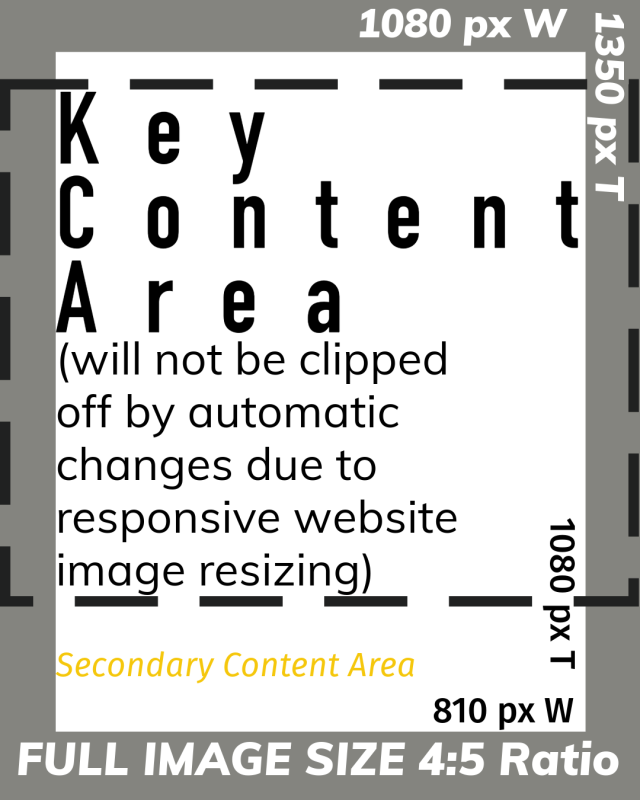
The dotted area inside the graphic (shown above and below) highlights the KEY CONTENT AREA where text and images will NOT automatically be cut off.
MAIN SOCIAL MEDIA AND WEBSITE Graphics contain headline text only. NO DETAILS.
Include any detailed text you think is needed on a SECOND graphic for use on the website and/or Instagram. The second graphic can be shared in a carousel on Instagram, and as part of the content of a webpage and a Mailchimp (or other sending method of) email.
Included below are 8 examples of the text content to use on the graphics for different event types.
LOGIN to your MBMAG account to view the examples and to view the email addresses where we share our announcements in the WHAT / WHERE / HOW WE ADVERTISE SECTION at the bottom of this web page.
PURPOSE OF WEBSITE & SOCIAL MEDIA GRAPHICS
Website and social media graphics are meant to catch the eye and entice people to immediately go to our website and sign up or find more details, or both. If we provide all the details on the graphic, the graphic is not readable on phones, and people are less incentivized to go to the website where they can sign up NOW.
Understanding the purpose in terms of traditional media: our graphics are the equivalent of photos on the front page of a newspaper or a TV advertisement. The images are eye catching and drive traffic to the newspaper or to a venue where the product can be purchased. The newspaper photo has NO TEXT. The headline of the paper is MINIMAL TEXT. The caption below the photo is MINIMAL TEXT. TV Advertisements show the product, only medication ads have a lot of text due to government requirements; for medication ads, the advertisers intentionally distract viewers from reading the text.
OVERVIEW
All graphics: 300 dpi, RGB color profile, JPG max quality compression (PNG where specified)
The website and Instagram post graphics are the same as of July 2024. As of February 2025, these guidelines have been updated to account for the new 4:5 ratio Instagram feed format.
- Graphics should be a minimum width of 1080 px by 1350 px tall @ 300dpi with key content in vertical center area w/ dimension ratio of 3.75:4
- Do NOT include the name of the guild or the guild logo. The website pages have the logo. Instagram shows our logo. If you do include the guild name or logo on the graphic, use a wide graphic and ensure that the logo and guild name are outside of the vertical center area.
- Graphic text contains headlines only. No details. Include any details on a SECOND image 1080 x 1350 px @ 300 dpi
- Keep key content centered vertically and horizontally in an area with a 3.75:4 ratio as shown below (810 px W x 1080 px T).
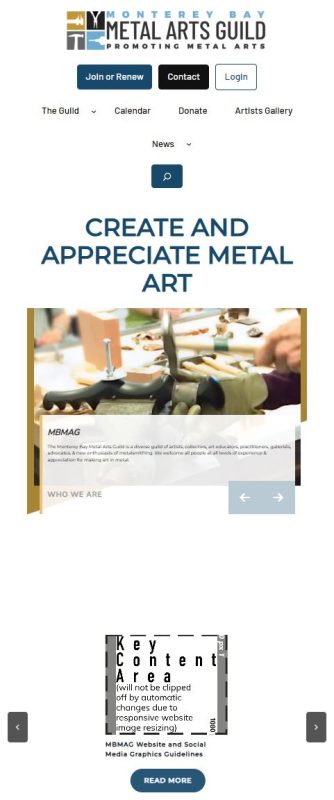
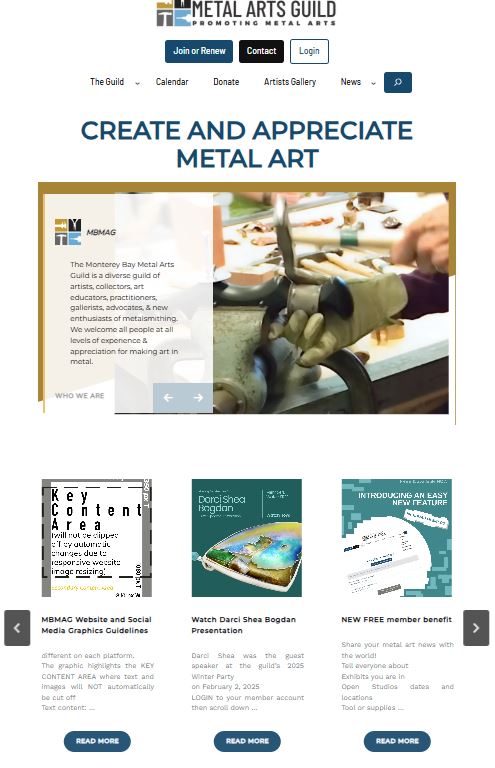
- The website will automatically crop the edges off the image when the image is displayed on the home page. See below for examples.
- Key content which is kept within the white area inside the dotted rectangle below will be shown on the majority of devices
- Content in the “Secondary Content Area” and gray areas of the graphic below may not be shown on all devices
Example of How the Above Graphic Displays on a Phone and on a Desktop Computer
Suggestions for Text to Use On Graphics
Example 1. Exhibit Call for Artists
Choose/Use one of the these: Call for Entries OR Call for Artists OR Open Call
ShowName
ShowVenue
ShowContent (either “Jewelry Exhibit + Sale” or “Jewelry & Sculpture Exhibit + Sale”)
Example 2. Exhibition Open – Advertise to the Public
ShowName
ShowVenue
ShowDateS
ShowContent (either “Jewelry Exhibit + Sale” or “Jewelry & Sculpture Exhibit + Sale”)
Example 3. Workshop Call for Students
WorkshopName
“Online”, “In-person”, or “Hybrid”
WorkshopInstructorName
WorkshopDates
Photo of Example(s)
Optional: Photo of Instructor
Example 4. Seminar
“Online” or “In-person”
“Reserve a Space NOW” (if needed)
“Free Art Seminar” OR “Art Seminar” and price
SeminarName
SeminarPresenter
SeminarDate(s)
SeminarTime(s)
Example 5. Party
“FREE” Summer or Winter “Party and Potluck”
Date & Time
“Reserve Spaces NOW” (If needed)
Party Venue (full address NOT needed)
Party Theme (if available) OR Guest Speaker Name (if applicable)
Example 6. Tool Swap Meet Call for Artists
CALL FOR ARTISTS
“Tool Swap Meet”
“Sell, Swap or Give Away”
“Tools & Supplies”
Signup Deadline
Date & Time of Swap Meet
Swap Meet Venue
Example 7. Tour / Field Trip
“Sign up Now” or “Save Spaces NOW”
Day/Date & Time
Venue
VenueLogo
3 – 5 Word Description of Event
“Register FREE NOW ” OR Price
Attendee Limit (#)
Example 8. Tool Swap Meet ADVERTISE to PUBLIC
“Tool Swap Meet”
“Buy, Swap or Pick up Free Tools & Supplies”
Date & Time
SwapVenue/Address
Advertising Platform Image Specifications
All graphics: 300 dpi, RGB color profile, JPG max quality compression
300dpi files with max quality compression are used because each time a file is uploaded to IG or FB, the file quality can be downgraded automatically. The file quality reduction is most noticeable with Instagram Reels Videos which must be radically overcompensated for ahead of time. The videos destined for Reels must be over brightened and exported at the highest quality. Our website and Instagram automatically convert JPG files to WebP files, which are smaller rich versions of the images. For the most current graphic sizes used by each social media platform, visit that companies website.
Mailchimp (JPG)
max file size 1 mb
max image width 600 px
| Columns | Recommended Image Width |
| Full-width section images | 564px |
| 2 column section images | 264px |
| 3 column section images | 164px |
MBMAG Website (JPG or PNG)
Post / Page Header
and secondary graphic (if needed: with key details)
horizontal image with ‘dead space’ to the left and right of a 1080 px W x 1350 px H * image with key info in vertical center 3.75:4 area
Graphic for Inclusion in the content area of a
Web Page (if needed)
600 px W x 200 px H minimum
AND 600 px W x 600 px H maximum
7680 px W x 4320 px H maximum; files up to 8MB
Instagram (JPG or PNG, MP4 or MOV)
Grid
1080 px W x 1350 px H max file size 30MB (JPG or PNG)
Stories
1080 px W x 1920 px H (14% of image (250px) at top AND bottom text-free); max photo file size 30MB, up to 6 sec long; MP4 or MOV up to 15 sec long max file size 4GB
Reels
Aspect Ration 1.91:1 OR 9:16 minimum 30 fps, min res 720 px
1080 px W x 1920 px H (14% of image (250px) at top AND bottom text-free), overbrightened, highest quality MP4 file max size 4GB and 60 seconds long as MP4 or MOV
More details here: https://www.facebook.com/help/instagram/1038071743007909
Reels Cover Photo
420 px x 654 px (1:1.155 ratio) as JPG or PNG
Facebook (JPG or PNG, MP4 or MOV):
CHECK ADOBE FOR CURRENT SIZES https://www.adobe.com/express/discover/sizes/facebook
Facebook Post
1080 px W x 1350 px H minimum
1350 px W x 1350 px H maximum
Facebook Stories
1080 px W x 1920 px H (14% of image (250px) at top AND bottom text-free) JPG or PNG, 30MB max photo files size, up to 5 sec long; MP4 or MOV up to 15 sec long max file size 4GB
Facebook PAGE Cover Image
https://www.facebook.com/help/125379114252045/
see drawing below
Facebook GROUP Cover Image
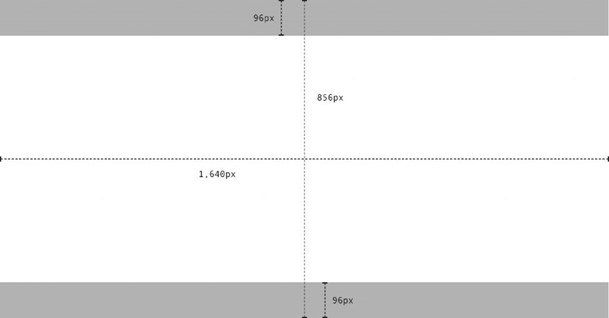
1,640px by 856px (or 1.91:1 ratio) see drawing below https://www.facebook.com/business/help/469767027114079?id=271710926837064
Facebook GROUP Cover Image Dimensions
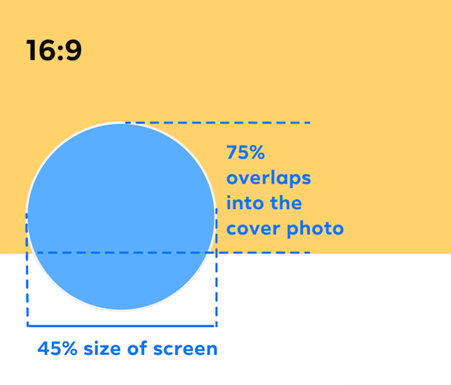
The diagram below illustrates the dimensions of the cover photo for a Facebook PAGE. We recommend not placing important information in the gray areas, as group visitors may not see the entire image on a mobile device.
Facebook PAGE Cover Image Dimensions
- Left aligns with a full bleed and a 16:9 aspect ratio.
- Must be at least 400 pixels wide and 150 pixels tall.
- Loads fastest as an sRGB JPG file that’s 851 pixels wide, 315 pixels tall and less than 100 kilobytes.
For profile pictures and cover photos with your logo or text, you may get a better result by using a PNG file. The left side of your cover photo will be partially covered by your profile picture, and may be cropped and resized to fit different screens.
To preview how your Page’s cover photo and profile picture may appear together, please see the example below.
https://www.facebook.com/business/help/292794301336717?id=526867548205796
https://www.facebook.com/help/125379114252045/
Specifications as of 20240209